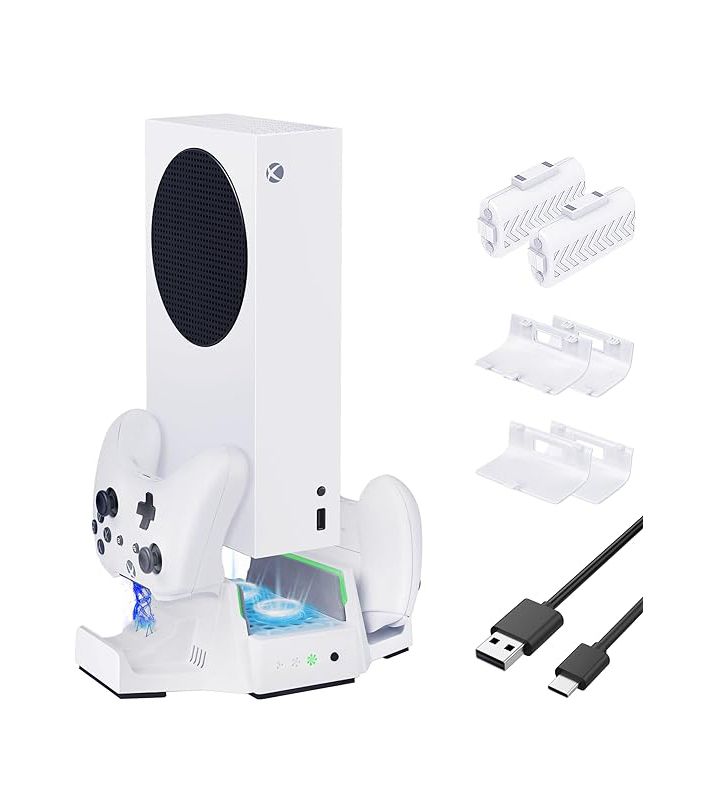
Multifunctional cooling stand is a new designed cooling base for X-B Series S console. The cooling stand can not only reduce the operating temperature of the X-B Series S console, but also charge the X-B controller (with the TYX-0612 battery pack). At the same time, it can be used as a dock for the X-B Series S console with strong compatibility.This product can effectively reduce the temperature of X-B Series S console, improve console performance and decrease power loss. The fan control switch of this product is the single-key self-reset key switch, in which the intelligent chip control is adopted. By pressing this switch slightly. you can make the fan switched in four speeds by turns. The fan control switch on the cooling stand controls the speed of the cooling fan, and can be toggled as needed between the speeds (high, medium, low, off). The air circulation of the console system can be accelerated to effectively prevent over temperature of the console. reduce the power consumption of the whole machine and prolong the life of the console. The two charging slots for X-B controller are set up in the left and right sides of the base, which can charge when the controller is put on.When place the controllers in the charging slots, you can see the charging status clearly.The correspond- ing charging light will turn to a red and display a green light when the controller is fully charged.
Series S console.
The two built-in high rotation speed fans can speed up the internal air circulation of X-B Series S console, in order to achieve the purpose of heat dissipation.
The fan control switch on the cooling stand controls the speed of the cooling fan, and can be toggled as needed between the speeds (high, medium, low. off). At the same time with a speed indicator light, high, medium and low light switch, and OFF means all lights are OFF.
This product is powered by the USB port on the X-B Series S console without additional configuration of power supply.
This product can charge two X-B controllers at the same time. When charging, the corresponding charging light will turn red and change to green when fully charged. Charging status of controller is very clearly. The product has one Type A USB 2.0 data transfer port at the back which is mainly used to connect the X-B controller to play games.At the same time, it also provides 5V DC power output. Since this USB2.0 port takes power directly from the X-B console,when the two X-B controller charging on the slots, it is not recom- mended to connect a large current charging load outside the USB2.0 port. Otherwise it will cause the X-B controller or external connection devices to fail to charge normally. The USB2.0 port can also be used to charge the other products if there is no controller on the charger (but this port may not be compatible with some digital products).
Product Specifications: Input: 5V/2A (connect the console directly with the
subsidiary USB cable) Output of the ports of controller charging slots: 2.4V/ 300mA 2
USB 2.0 Port Output: 5V/500mA 2 (Since this USB2.0 port takes power directly from the X-B console, when the two X-B controller charging on the slots, it is not recommended to connect a large current charging load outside the USB2.0 port. Otherwise it will cause the X-B controller or external connection devices to fail to charge normally.)
Cooling Levels of the Fans High Speed: 4500+400 rev/min (fastest) Medium Speed: 4000:400 rev/min, Low speed: 3000400 rev/min. There are two Built-in Fans.
Charging time 3-35H xAccessories: 1 USB cable.
Product instructions:
Place the this product on a well ventilated table, and then place the X-B Series S console vertically on the fan base. Pay attention to place the front side of X-B Series S console (with start switch surface) and the front side of base (with star switch) on the same side. Then connect the console and fan base with the USB data cable which is provided along with this product.
Attention:
Please place this product on the platform table and well ventilated place. Please use the USB cable accompanying this product.
This product is a ventilation and heat dissipation product. so do not obstruct ventilation grate on any surface when using this product.
Do not plug any object from the heat hole (especially metal device), which will cause the circuit in the fan base to be short circuited, thus causing damage to the product
For cleaning of this product, please use dry cloth to wipe it, and do not use water or alcohol to clean this product. When cleaning this product, please disconnect this product from the X-Series S console or USB power supply.
When the product is not used for a long time, please unplug the peripherals of the ports connected to the product and the input plugs. It is forbidden to store or use this product in humid or high temperature environment.
.If the product is wet, soaked or damaged, please stop using it and send it to the professional maintenance department for repair. -Do not disassemble it without authorization.
What's in the box
1 x Xbox Series S Multifunctional Cooling Stand
2 x Xbox Series S Controller Battery
4 x Xbox Series S Controller Battery Covers
1 x Charging Cable