SALE
Wireless Carplay Adapter Compatible with Android Auto Carplay Dongle

Wireless Carplay Adapter Compatible with Android Auto Carplay Dongle

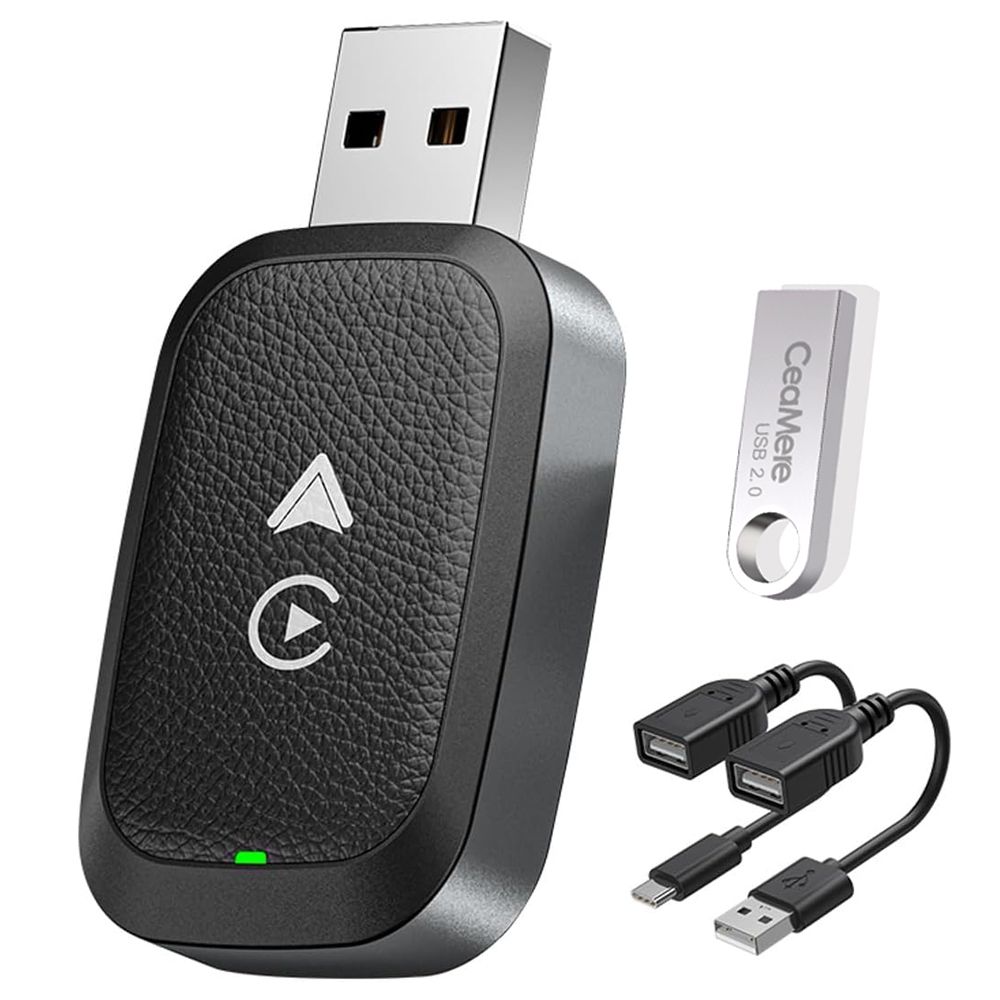
Wireless Dongle, 2 in 1 Mini Size with Extension USB-C/Type-C, Plug & Play,Compatible with iPhone iOS 10+/ Android 11+
5.01 Reviews
R 33.00R 40.32
🚚 Ships in 16-18 work days

Wireless Dongle, 2 in 1 Mini Size with Extension USB-C/Type-C, Plug & Play,Compatible with iPhone iOS 10+/ Android 11+

🛡️
Warranty
6-Month Limited Warranty.
↩️
Return Policy
Hassle-Free Exchanges & Returns for 7 Days.

Product Information

SKU99282137
Stock StatusIn Stock
Safe Checkout
  • 2-in-1 Wireless CarPlay Adapter for iOS and Android: Zero Cables! For Apple CarPlay and Android Auto Wireless Adapter, you can easily convert the existing wired to wireless. Enjoy all functions such as navigation, music playback, Siri and phone calls. Its 50% smaller design is perfect for small spaces and comes with USB-A and Type-C extension cables for flexible setup.
  • Plug and Play: Just connect your iOS phone or Android phone to the factory-provided wired Carplay or Android Auto car (models: 2017 to 2024), plug your wireless adapter into the USB port, and then connect to your phone via WiFi Bluetooth to work perfectly. No need to connect manually afterwards, our adapter will automatically activate the CarPlay wireless connection as soon as the vehicle starts.
  • Dual-band smart chip: 2.4G/5.8 GHz WiFi, lightning-fast startup, no delay. The connection is stable and reliable, with few delays and connection problems during the connection process. Dual-band automatic switching, compatible with more devices, better facing complex usage scenarios.
  • Smart Driving Experience: You can enjoy all the features of CarPlay, including navigation, music, Siri, and phone calls, through voice control, steering wheel, touch screen, and knob operation. Enjoy a safer and smarter driving experience.
  • Applicable: Applicable to 98% of cars equipped with factory wired CarPlay & Android Auto after 2017, and must run iOS 10 and Android 11.0 or later. If you are not sure whether your car is equipped with factory wired CarPlay & Android Auto, please contact us or check it yourself on the CarPlay & Android Auto website. In addition, this wireless car playback dongle does not support BMW, Tesla, certain models, and certain aftermarket stereos.

1. Forget the regular Bluetooth & Wifi connection to the car.

2. Start the car.

3. On the car's touch screen, turn to the CarPlay screen. Wait for the module to be loaded.

4. Plug wireless Carplay box into the wired CarPlay USB A socket.

5. Wait for the CarPlay icon on the car's screen to light up.

6. Once the car's screen icon for CarPlay lights up, press it. It starts to Bluetooth search.

7. Go to the Phone settings and start Bluetooth searching. When your cars' make appears as an item to pair with, select it.

8. The car's screen will come up with a pairing item - choose to pair.

9. Go to the Phone settings and start wifi searching. When your cars' make appears as an item to join with, select it.

10. When asked on the Phone to allow CarPlay to wirelessly link, choose allow.

What's in the box
Carplay Adapter x 1
Instruction manual x 1
usb cable x 2
USB flash drive x 1

  • 2-in-1 Wireless CarPlay Adapter for iOS and Android: Zero Cables! For Apple CarPlay and Android Auto Wireless Adapter, you can easily convert the existing wired to wireless. Enjoy all functions such as navigation, music playback, Siri and phone calls. Its 50% smaller design is perfect for small spaces and comes with USB-A and Type-C extension cables for flexible setup.
  • Plug and Play: Just connect your iOS phone or Android phone to the factory-provided wired Carplay or Android Auto car (models: 2017 to 2024), plug your wireless adapter into the USB port, and then connect to your phone via WiFi Bluetooth to work perfectly. No need to connect manually afterwards, our adapter will automatically activate the CarPlay wireless connection as soon as the vehicle starts.
  • Dual-band smart chip: 2.4G/5.8 GHz WiFi, lightning-fast startup, no delay. The connection is stable and reliable, with few delays and connection problems during the connection process. Dual-band automatic switching, compatible with more devices, better facing complex usage scenarios.
  • Smart Driving Experience: You can enjoy all the features of CarPlay, including navigation, music, Siri, and phone calls, through voice control, steering wheel, touch screen, and knob operation. Enjoy a safer and smarter driving experience.
  • Applicable: Applicable to 98% of cars equipped with factory wired CarPlay & Android Auto after 2017, and must run iOS 10 and Android 11.0 or later. If you are not sure whether your car is equipped with factory wired CarPlay & Android Auto, please contact us or check it yourself on the CarPlay & Android Auto website. In addition, this wireless car playback dongle does not support BMW, Tesla, certain models, and certain aftermarket stereos.

1. Forget the regular Bluetooth & Wifi connection to the car.

2. Start the car.

3. On the car's touch screen, turn to the CarPlay screen. Wait for the module to be loaded.

4. Plug wireless Carplay box into the wired CarPlay USB A socket.

5. Wait for the CarPlay icon on the car's screen to light up.

6. Once the car's screen icon for CarPlay lights up, press it. It starts to Bluetooth search.

7. Go to the Phone settings and start Bluetooth searching. When your cars' make appears as an item to pair with, select it.

8. The car's screen will come up with a pairing item - choose to pair.

9. Go to the Phone settings and start wifi searching. When your cars' make appears as an item to join with, select it.

10. When asked on the Phone to allow CarPlay to wirelessly link, choose allow.

What's in the box
Carplay Adapter x 1
Instruction manual x 1
usb cable x 2
USB flash drive x 1

More in Car Audio Accessories