SALE
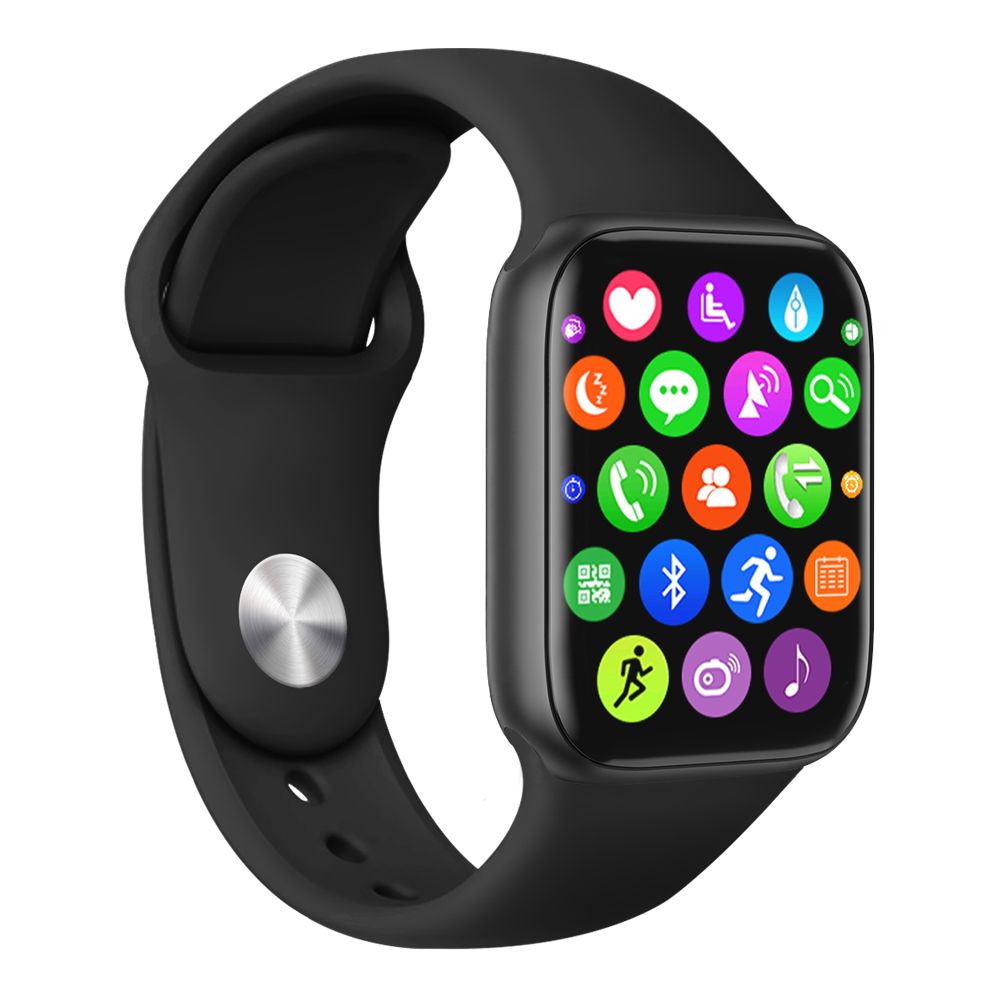
Waterproof Pedometer

Waterproof Pedometer

Smart,Bracelet ,Smart,Watch ,Bluetooth,Smart,Watch ,Smart,Wa
No reviews yet
R 71.00R 73.36
🚚 Ships in 16-18 work days

Smart,Bracelet ,Smart,Watch ,Bluetooth,Smart,Watch ,Smart,Wa

🛡️
Warranty
6-Month Limited Warranty.
↩️
Return Policy
Hassle-Free Exchanges & Returns for 7 Days.

Product Information

SKU100603448
Stock StatusIn Stock
Safe Checkout

1 Clock display, intelligent alarm clock. 2 Exercise steps, sleep monitoring, calorie counting and analysis. 3 The reminder of the call, SMS and messages, like from Wechat, QQ etc. 4 Intelligent Anti-Lost; Remote Photographing by Shake it off. 5 Map record motion track, sports health data sharing.Features:
1. Clock display, intelligent alarm clock.
2. Exercise steps, sleep monitoring, calorie counting and analysis.
3. The reminder of the
call
, SMS and messages, like from Wechat, QQ etc.
4. Intelligent Anti-Lost; Remote Photographing by Shake it off.
5. Map record motion track, sports health data sharing.
6. OTA firmware updates online. Record the Sport Track on the APP map.
Specification:
Material: Zinc Alloy + PU
Colour: Black
The System Requirements for the Cellphone Bluetooth: Android4.3, IOS 7.0 or above, Support Bluetooth 4.0
mobile phone
Size: Dial: 45 x 45 x 10 mm/ 1.8 x 1.8 x 0.4 in
Band Width: 20 mm/ 0.8 in
Watch Length: 260 mm/ 10.2 in
Package list:
1 x Smart Watch
1 x USB Cable
1 x Chinese and English Instructions
Note:
1. The product adopts IP67 waterproof design, can be used for normal water resistance of daily life. But it is forbidden to be exposed to the water or be immersed under the water for a long time.
2. If you find that there is no change for the data, please wait patiently for the data synchronization. It will takes some time for the synchronous data to be uploaded.
3. In view of the limited memory of the watch, the watch usually can only save 7-day exercise data. Please regularly connect the bluetooth to the mobile phone, so you can upload and sync the data to your mobile phone with bluetooth, for saving.
Function Operation:
1.
Download and Install Watch APP/APK Client Software
As for the mobile phones, pls search "DayDay Band" in the store, download and install the watch APP; As for the Android mobile phones, pls search "DayDay Band" in the google play store, 360 phone assistant, or the baidu phone assistant etc. in China. Also u can scan the QR code as follows, then download and install client APP/APK software "DayDay Band" for watch.
2.
Connect the Watch with the Mobile APP
The smart functions of the watch on the APP can be used all the while, no need to power on/off the watch. Unless there is no power with the watch. When entering the APP, pls click the Settings icon on the top left corner of the home page. Select to search the equipment, the program will automatically search bluetooth devices nearby. And u can also gently slide the refreshing interface down, It will automatically search the bluetooth devices. Pls click it to connect the bluetooth of the watch with your phone when the "FOXWEAR" appears on the APP. After the bluetooth is connected successfully, the LED indicator light at the position of 12:00, within the
watch dial, will vibrate and blink, and the APP/APK will automatically switch to the main interface.
Note: you can modify the name of the bluetooth devices on the APP.
3.
Start to Use the Smart Watch
After the bluetooth of the watch is connected to the mobile phone successfully, it will begin to record your exercise and sleep status.
Note: The watch will automatically start to detect the sleep data after 6 pm, no sleep data during the daytime. When firstly using it, the watch needs to be connected with the APP, to calibrate the the watch data and it will sync the time automatically. Or the data of step calculation and sleep will be inaccurate.
4.
Data Synchronization
Pls enter the menu interface of the pedometer and sleep, slide down the menu, the watch data of step calculation and sleep will be synced in the APP/APK of mobile phone. It will also be showed at the corresponding position there. Also the watch will automatically synchronize step and sleep data regularly when it is connected with Bluetooth(The APP/APK will show the sleep data information after u have slept for 3 hours), so as to ensure the data is synced onto the main menu in the real time.
5.
Charging
When there is no vibration reminding with the watch and the APP/APK alarms about low battery, pls use its USB cable to connect with the computer or use its USB cable along with 5V domestic charger, to charge it timely. Or if u find the hands of clock stops walking, it means that the battery of the quartz watch has been depleted (this battery needed to be replaced usually around every 2 years). Please timely replace the battery for the watch. When changing the battery, please use the same type of battery and try your best to ask the professional or the repair man of the watch repair shop to replace it for your watch. When disassembling, pls use the specialized tools to open the rear cover of the watch.

What's in the box
1 x Smart Watch, 1 x USB Cable, 1 x Chinese/English Instructions

1 Clock display, intelligent alarm clock. 2 Exercise steps, sleep monitoring, calorie counting and analysis. 3 The reminder of the call, SMS and messages, like from Wechat, QQ etc. 4 Intelligent Anti-Lost; Remote Photographing by Shake it off. 5 Map record motion track, sports health data sharing.Features:
1. Clock display, intelligent alarm clock.
2. Exercise steps, sleep monitoring, calorie counting and analysis.
3. The reminder of the
call
, SMS and messages, like from Wechat, QQ etc.
4. Intelligent Anti-Lost; Remote Photographing by Shake it off.
5. Map record motion track, sports health data sharing.
6. OTA firmware updates online. Record the Sport Track on the APP map.
Specification:
Material: Zinc Alloy + PU
Colour: Black
The System Requirements for the Cellphone Bluetooth: Android4.3, IOS 7.0 or above, Support Bluetooth 4.0
mobile phone
Size: Dial: 45 x 45 x 10 mm/ 1.8 x 1.8 x 0.4 in
Band Width: 20 mm/ 0.8 in
Watch Length: 260 mm/ 10.2 in
Package list:
1 x Smart Watch
1 x USB Cable
1 x Chinese and English Instructions
Note:
1. The product adopts IP67 waterproof design, can be used for normal water resistance of daily life. But it is forbidden to be exposed to the water or be immersed under the water for a long time.
2. If you find that there is no change for the data, please wait patiently for the data synchronization. It will takes some time for the synchronous data to be uploaded.
3. In view of the limited memory of the watch, the watch usually can only save 7-day exercise data. Please regularly connect the bluetooth to the mobile phone, so you can upload and sync the data to your mobile phone with bluetooth, for saving.
Function Operation:
1.
Download and Install Watch APP/APK Client Software
As for the mobile phones, pls search "DayDay Band" in the store, download and install the watch APP; As for the Android mobile phones, pls search "DayDay Band" in the google play store, 360 phone assistant, or the baidu phone assistant etc. in China. Also u can scan the QR code as follows, then download and install client APP/APK software "DayDay Band" for watch.
2.
Connect the Watch with the Mobile APP
The smart functions of the watch on the APP can be used all the while, no need to power on/off the watch. Unless there is no power with the watch. When entering the APP, pls click the Settings icon on the top left corner of the home page. Select to search the equipment, the program will automatically search bluetooth devices nearby. And u can also gently slide the refreshing interface down, It will automatically search the bluetooth devices. Pls click it to connect the bluetooth of the watch with your phone when the "FOXWEAR" appears on the APP. After the bluetooth is connected successfully, the LED indicator light at the position of 12:00, within the
watch dial, will vibrate and blink, and the APP/APK will automatically switch to the main interface.
Note: you can modify the name of the bluetooth devices on the APP.
3.
Start to Use the Smart Watch
After the bluetooth of the watch is connected to the mobile phone successfully, it will begin to record your exercise and sleep status.
Note: The watch will automatically start to detect the sleep data after 6 pm, no sleep data during the daytime. When firstly using it, the watch needs to be connected with the APP, to calibrate the the watch data and it will sync the time automatically. Or the data of step calculation and sleep will be inaccurate.
4.
Data Synchronization
Pls enter the menu interface of the pedometer and sleep, slide down the menu, the watch data of step calculation and sleep will be synced in the APP/APK of mobile phone. It will also be showed at the corresponding position there. Also the watch will automatically synchronize step and sleep data regularly when it is connected with Bluetooth(The APP/APK will show the sleep data information after u have slept for 3 hours), so as to ensure the data is synced onto the main menu in the real time.
5.
Charging
When there is no vibration reminding with the watch and the APP/APK alarms about low battery, pls use its USB cable to connect with the computer or use its USB cable along with 5V domestic charger, to charge it timely. Or if u find the hands of clock stops walking, it means that the battery of the quartz watch has been depleted (this battery needed to be replaced usually around every 2 years). Please timely replace the battery for the watch. When changing the battery, please use the same type of battery and try your best to ask the professional or the repair man of the watch repair shop to replace it for your watch. When disassembling, pls use the specialized tools to open the rear cover of the watch.

What's in the box
1 x Smart Watch, 1 x USB Cable, 1 x Chinese/English Instructions

More in Smart Watches