SALE
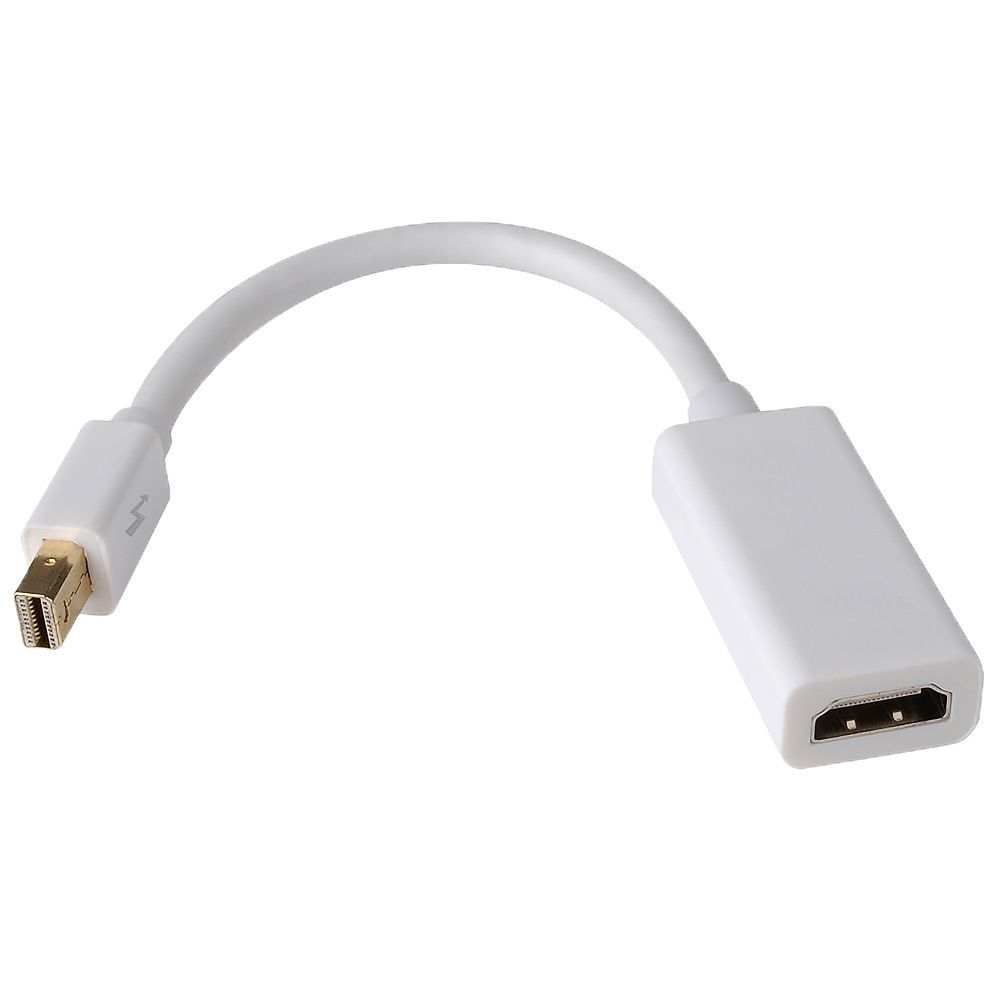
Raz Tech Thunderbolt Mini Display Port to HDMI Adapter Cable Connector

Raz Tech Thunderbolt Mini Display Port to HDMI Adapter Cable Connector

Brand: Raz Tech
Raz Tech Thunderbolt Mini Display Port to VGA Adapter Cable Connector Instructions: Please drag the window on the deskt…
3.97 Reviews
R 15.00R 17.81
🚚 Ships in 7-9 work days

Raz Tech Thunderbolt Mini Display Port to VGA Adapter Cable Connector Instructions: Please drag the window on the desktop all the way over to the display edge and the window will be displayed on the ...

🛡️
Warranty
6-Month Limited Warranty.
↩️
Return Policy
Hassle-Free Exchanges & Returns for 7 Days.

Product Information

SKU52583796
Stock StatusIn Stock
Safe Checkout

Raz Tech Thunderbolt Mini Display Port to VGA Adapter Cable Connector

Instructions:
Please drag the window on the desktop all the way over to the display edge and the window will be displayed on the HDTV. You may set HDTV to a mirror display.

  1. With your TV connected to Mac, open System Preference
  2. Select Display
  3. Select Arrangement tag
  4. Check Mirror Display

Transmitting audio to TV
1. Open System Preference
2. Select Sound
3. Select Output tag
4. Choose external HDMI instead of built-in speaker

Specifications:
- Supports full 1080p HD digital video
- Supports HDMI Deep Color 12 bit per channel (36 bit color depth)
- Supports HDMI 225 MHz/2.25 Gbps per channel (6.75 Gbps all channel) bandwidth
- Supports uncompressed digital LPCM 7.1, 5.1 or 2 channels and compressed digital Bit-Stream
- Connector: Gold plated Mini Display-Port/Thunderbolt male & HDMI female
- HDCP compliant

Popular Compatible Models (List is not complete)
- MacBook
- MacBook Pro
- MacBook Pro with Retina Display
- MacBook Air
- iMac
- Mac Mini
- Mac Pro

Lenovo ThinkPad
- X1 Carbon
- X230
- L430/530
- T430s/430/530
- W530
- Microsoft Surface for Windows 8 Pro (Does NOT work with Surface for Windows RT)
- HP Envy 14/17
- Dell XPS 14/15/17
- Google Chromebook Pixel

What's in the box
1x ThunderBolt to HDMI Adapter

Raz Tech Thunderbolt Mini Display Port to VGA Adapter Cable Connector

Instructions:
Please drag the window on the desktop all the way over to the display edge and the window will be displayed on the HDTV. You may set HDTV to a mirror display.

  1. With your TV connected to Mac, open System Preference
  2. Select Display
  3. Select Arrangement tag
  4. Check Mirror Display

Transmitting audio to TV
1. Open System Preference
2. Select Sound
3. Select Output tag
4. Choose external HDMI instead of built-in speaker

Specifications:
- Supports full 1080p HD digital video
- Supports HDMI Deep Color 12 bit per channel (36 bit color depth)
- Supports HDMI 225 MHz/2.25 Gbps per channel (6.75 Gbps all channel) bandwidth
- Supports uncompressed digital LPCM 7.1, 5.1 or 2 channels and compressed digital Bit-Stream
- Connector: Gold plated Mini Display-Port/Thunderbolt male & HDMI female
- HDCP compliant

Popular Compatible Models (List is not complete)
- MacBook
- MacBook Pro
- MacBook Pro with Retina Display
- MacBook Air
- iMac
- Mac Mini
- Mac Pro

Lenovo ThinkPad
- X1 Carbon
- X230
- L430/530
- T430s/430/530
- W530
- Microsoft Surface for Windows 8 Pro (Does NOT work with Surface for Windows RT)
- HP Envy 14/17
- Dell XPS 14/15/17
- Google Chromebook Pixel

What's in the box
1x ThunderBolt to HDMI Adapter

More in Networking Cables