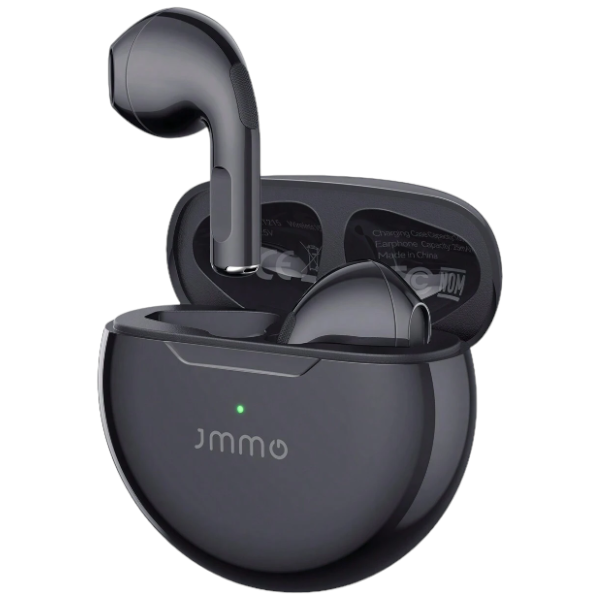
Subtitle:Touchscreen Bluetooth Headphones, Wireless Earbuds with Smart Control for Music/Volume/Noise Cancelling&More
Smart Led Touch Screen Charging Case The Wireless Earphones Have A Large Led Touch Screen That Allows You To Check The Date And Time, As Well As Clearly Display The Battery Level And Bluetooth Connection Status Of The Earbuds And Charging Case. It Also Has Music Equalizer, Find Headphones, Take Photos, Adjust Brightness, Adjust Time, Set Alarm, Adjust Song Volume And Skip Songs, Display Lyrics And Other Functions. This Makes It Super Easy To Manage Music And Calls.
Ear Clip Design With Stereo Sound Wireless Earbuds Adopt The Unique Digital Audio Processor And Powerful Drivers To Enhance And Reproduce Perfect Hifi Immersive Stereo Audio, Equipped With High-Definition Audio Decoding To Restore Richer Sound Details. The Open Ear Clip Earbuds Are Based On An Ergonomic Design To Prevent The Complete Sealing Of The Canal, Reducing Discomfort During Long Wear.
Comfortable And Secure Fit For Everyday Use Open Ear Earbuds Weigh Only 51G, Typically Lighter And More Breathable Than Other Headphones, Which Makes Them More Comfortable To Wear For Extended Periods Of Time. Constructed From Innovative, Non-Deforming Hard-Shell Material, The Clip On Earbuds Are Meticulously Designed To Retain Their Shape For A Consistently Secure Fit, No Matter How Much You Use Them.
Noise Reduction & Crystal Clear Calls Intelligent Noise Filtering Technology Minimizes Audio Distractions, Allowing You To Hear Crystal Clear Calls Like You Are Communicating Face To Face With Others, And Enjoy Clear Hands-Free Calling.
Auto Quick Pairing & Bluetooth 5.4 This Bluetooth Earphones Adopts Hall Switch. When Your Device Is Paired With The Earbuds Wireless Bluetooth, Just Open The Charging Case, The Wireless Ear Buds Will Automatically Pair With Your Device; This Ear Buds Wireless Bluetooth Earbuds Uses A Bluetooth 5.4 Chip, Making Your Connection Faster And More Stable, Allowing You To Focus On Music And Calls.
Product Specifications
1. Bluetooth Version: Bluetooth 5.49
2. Supported Codecs: Aac / Sbc
3. Bluetooth Transmission Distance: 10M
4. Carrier Frequency: 2.402Ghz ~ 2.480Ghz
5. Frequency Response Range: 20Hz ~ 20Khz
6. Driver Size: 10Mm
7. Driver Sensitivity: 105Db 3Db
8. Driver Impedance: 16 15%
9. Driver Rated Power: 8Mw
10. Headphone Battery Capacity: 3.7V - 4.2V / 30Mah (Polymer Battery)
11. Charging Case Battery Capacity: 3.7V - 4.2V / 500Mah (Polymer Battery)
12. Headphone Usage Time: 4 - 5 Hours
13. Headphone Single Charging Time: 1.5 Hours
14. Charging Case Charging Time: 1.5 Hours
15. Number Of Charges From Case To Headphones: Approximately 3 - 4 Times
16. Standby Time (Power Off): 3000 Hours
17. Charging Port: Usb Type
18.Waterproof:IPX4
How To Use The Headset For The First Time:
1. When Connecting To Bluetooth For The First Time, Be Sure To Take Out The Two Headphones Charging Box, Two Headphones Together, About 5 Seconds After The Two Headphones Lights, One Of The Headphones Lights Do Not Flash, Then The Two Headphones Are Connected. This Way You Can Turn On Your Phone Bluetooth And Find The Bluetooth Name Connection Of Your Headset. If You Take Out Two Earphones, The Lights Of Both Earphones Have Been Flashing, Indicating That The Two Earphones Are Not Paired, There Is No Need To Hurry Here, You Can Put The Two Earphones Back Into The Charging Box Cover. After About 3 Seconds, Then Take Out Again And Put Together, After 5 Seconds Or So, One Of The Headset Lights Does Not Flash Is Paired, If 5 Seconds Later Or Not Paired, Then Wait A Little Longer To See If There Is A Match, Generally This Operation Can Be Paired Successfully.
2. If Two Headsets Are Connected To Bluetooth Without Pairing, Then It May Only Connect To One Of Your Headphones And The Other Without Sound. At This Time, You Can Cancel Your Bluetooth Connection, Bluetooth Off, And Then Put The Two Earphones Back Into The Charging Box, And Then Take Out The Charging Box Again According To The First Use, And Follow The First Step.
3. As Long As There Is No Problem When Connecting Bluetooth For The First Time, When You Use The Bluetooth Headset Later, There Is No Problem With Single Use And Both Use.
4. If The Earbuds Are Not In English When You First Use Them, Double-Click Them When They Are Not Connected To Your Phone To Switch To English.
What's in the box
1×Bluetooth Headsets
1×Charging Box
1×Cable