SALE
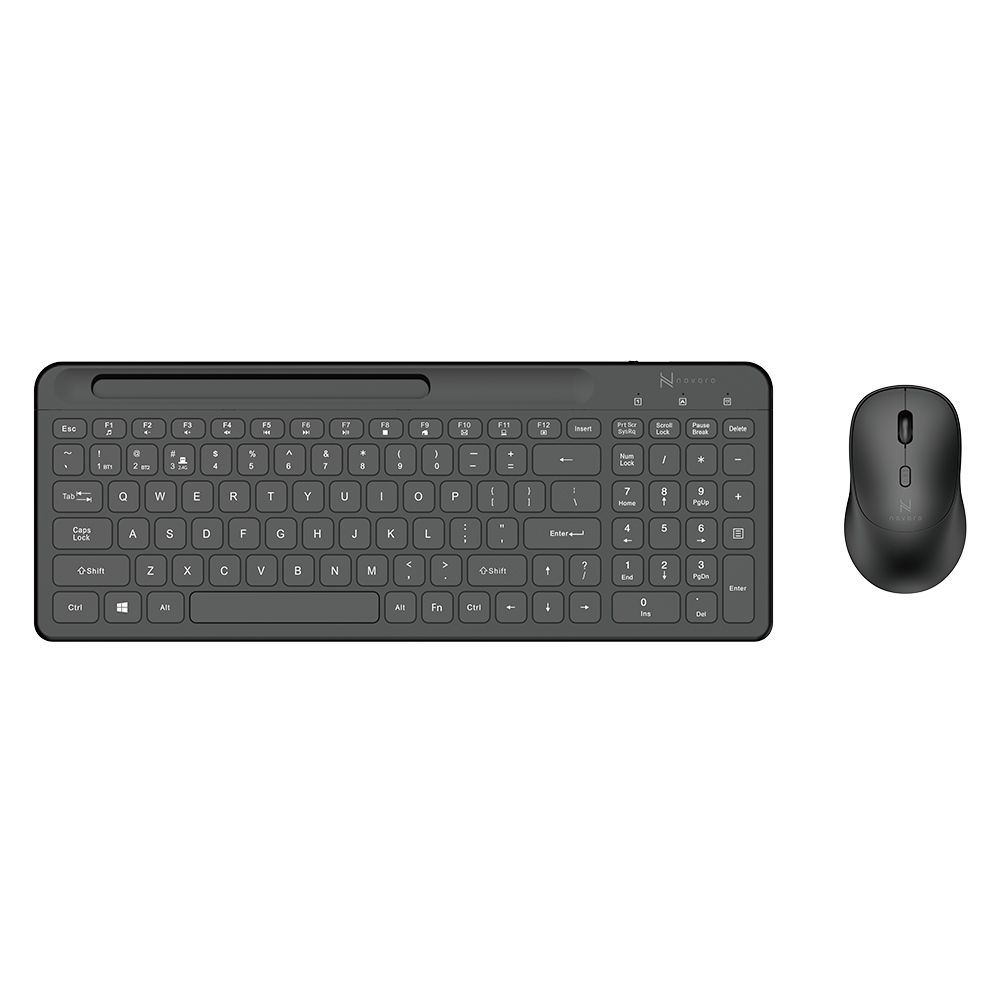
Novaro Bluetooth & 2.4G Rechargeable Wireless Keyboard & Mouse Combo

Novaro Bluetooth & 2.4G Rechargeable Wireless Keyboard & Mouse Combo

Key Selling FeaturesDual-Mode Connectivity: Seamlessly switch between 2.4G wireless with USB receiver and Bluetooth for …
4.013 Reviews
R 42.00R 50.40
🚚 Ships in 3-5 work days

Key Selling FeaturesDual-Mode Connectivity: Seamlessly switch between 2.4G wireless with USB receiver and Bluetooth for a stable connection to PCs, laptops, tablets, or smartphones.Rechargeable Conven...

🛡️
Warranty
6-Month Limited Warranty.
↩️
Return Policy
Hassle-Free Exchanges & Returns for 7 Days.

Product Information

SKU98875831
Stock StatusIn Stock
Safe Checkout

Key Selling Features

  • Dual-Mode Connectivity: Seamlessly switch between 2.4G wireless with USB receiver and Bluetooth for a stable connection to PCs, laptops, tablets, or smartphones.
  • Rechargeable Convenience: Built-in Type-C charging port powers both keyboard and mouse for weeks, eliminating battery replacements.
  • Ergonomic & Precise: Slim keyboard with quiet keys and a 1000 DPI mouse with smooth scroll roller and responsive buttons for all-day comfort.
  • Multi-Device Compatibility: Supports Windows XP/7/8/10, MacOS X 10.7 or later, Android 4.0 or higher, iOS 13 or later, and Linux 5.0 or higher.
  • Quick Pairing: Easy connection with clear indicator lights and shortcut keys for hassle-free setup.
  • Built-in Cellphone Holder: Integrated stand keeps your phone or tablet at the perfect angle for messaging, video calls, or viewing.
  • Multimedia Shortcuts: Dedicated Fn keys enhance control with volume, media, and more.

Connection Shortcut Keys

Keyboard Bluetooth Pairing

  • Short press Fn + BT1 to connect Bluetooth Device 1 (flashes once).
  • Short press Fn + BT2 to connect Bluetooth Device 2 (flashes once).
  • Long press Fn + BT1/BT2 for pairing (flashes quickly).
  • Long press Fn + 2.4G for 2.4G pairing with dongle (flashes).

Mouse Bluetooth Pairing

  • Short press Fn + BT1 to connect Bluetooth Device 1 (flashes once).
  • Short press Fn + BT2 to connect Bluetooth Device 2 (flashes once).
  • Long press Fn + BT1/BT2 for pairing (flashes quickly).
  • Long press Fn + 2.4G for 2.4G pairing with dongle (flashes).

Power & Mode Switching

  • Short press Fn + On/Off Switch to toggle power/mode.

Why Choose Novaro?

  • Effortless Setup: Plug-and-play USB or Bluetooth pairing in seconds with indicator guidance.
  • Durable Design: Built to withstand daily use with a reliable, rechargeable power source.

What's in the box
1 x Novaro Wireless Keyboard
1 x Novaro Wireless Mouse
1 x USB Type-C Charging Cable
1 x 2.4G USB Receiver
1 x User Manual

Key Selling Features

  • Dual-Mode Connectivity: Seamlessly switch between 2.4G wireless with USB receiver and Bluetooth for a stable connection to PCs, laptops, tablets, or smartphones.
  • Rechargeable Convenience: Built-in Type-C charging port powers both keyboard and mouse for weeks, eliminating battery replacements.
  • Ergonomic & Precise: Slim keyboard with quiet keys and a 1000 DPI mouse with smooth scroll roller and responsive buttons for all-day comfort.
  • Multi-Device Compatibility: Supports Windows XP/7/8/10, MacOS X 10.7 or later, Android 4.0 or higher, iOS 13 or later, and Linux 5.0 or higher.
  • Quick Pairing: Easy connection with clear indicator lights and shortcut keys for hassle-free setup.
  • Built-in Cellphone Holder: Integrated stand keeps your phone or tablet at the perfect angle for messaging, video calls, or viewing.
  • Multimedia Shortcuts: Dedicated Fn keys enhance control with volume, media, and more.

Connection Shortcut Keys

Keyboard Bluetooth Pairing

  • Short press Fn + BT1 to connect Bluetooth Device 1 (flashes once).
  • Short press Fn + BT2 to connect Bluetooth Device 2 (flashes once).
  • Long press Fn + BT1/BT2 for pairing (flashes quickly).
  • Long press Fn + 2.4G for 2.4G pairing with dongle (flashes).

Mouse Bluetooth Pairing

  • Short press Fn + BT1 to connect Bluetooth Device 1 (flashes once).
  • Short press Fn + BT2 to connect Bluetooth Device 2 (flashes once).
  • Long press Fn + BT1/BT2 for pairing (flashes quickly).
  • Long press Fn + 2.4G for 2.4G pairing with dongle (flashes).

Power & Mode Switching

  • Short press Fn + On/Off Switch to toggle power/mode.

Why Choose Novaro?

  • Effortless Setup: Plug-and-play USB or Bluetooth pairing in seconds with indicator guidance.
  • Durable Design: Built to withstand daily use with a reliable, rechargeable power source.

What's in the box
1 x Novaro Wireless Keyboard
1 x Novaro Wireless Mouse
1 x USB Type-C Charging Cable
1 x 2.4G USB Receiver
1 x User Manual

More in Keyboard & Mouse Sets