SALE
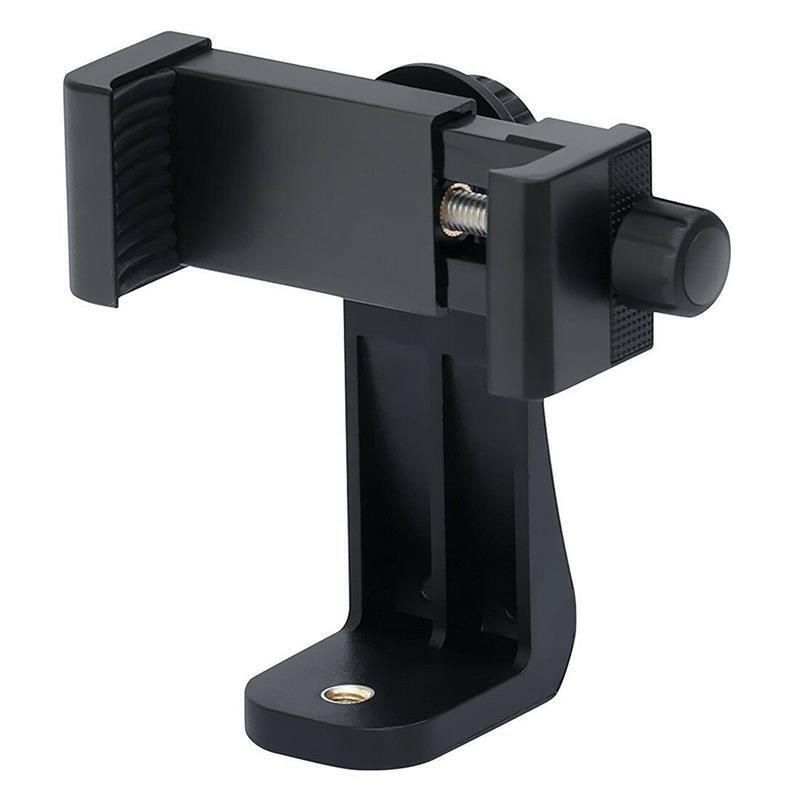
Magnetic Phone Holder

Magnetic Phone Holder

Magnetic Phone Shooting Accessory - Bluetooth Remote Photography & Tripod Compatible
No reviews yet
R 51.00R 83.91
🚚 Ships in 3-5 work days

Magnetic Phone Shooting Accessory - Bluetooth Remote Photography & Tripod Compatible

🛡️
Warranty
6-Month Limited Warranty.
↩️
Return Policy
Hassle-Free Exchanges & Returns for 7 Days.

Product Information

SKU101547821
Stock StatusIn Stock
Safe Checkout

Magsafe Camera Grip Controller - Professional Wireless Shooting Assistant

A tech-integrated shooting accessory combining MagSafe magnetic technology, ergonomic design, and multi-functional controls for stable, efficient operation.

Core Technical Features

  • Compatibility: Native support for iPhone 12+ (MagSafe-enabled). Android/HarmonyOS devices require the included magnetic ring or a third-party magnetic case (naked phone magnetic ring installation not recommended). Incompatible with HarmonyOS NEXT 5.0+ Huawei devices/Samsung.
  • Ergonomic Design: PalmR45 curved grip (R=45mm) with 9mm finger spacing, replicating natural palm joint arc for fatigue-free extended shooting.
  • Shooting Controls: Two-stage mechanical shutter (half-press: focus; full-press: capture/record), zoom dial, mode switch, front/rear camera toggle, one-tap camera launch-enables one-handed blind operation via WaveFit 9 dual-finger positioning.
  • Magnetic System: Adsorption force 8x typical phone weight (190-230g), max load 3KG (phone + magnetic case/ring: 220-250g). Supports stable horizontal/vertical shooting switching.
  • Wireless Remote: Detachable design with 10m control range and magnetic quick-release for flexible remote shooting.
  • Expandability & Portability: 1/4-inch threaded hole for tripods; dual-sided magnetic adsorption compatible with magnetic fill lights. Net weight 109g (gross weight 130g).
  • Protection & Durability: Silicone magnetic surface prevents scratches; included lanyard for anti-drop protection. Ultra-low power consumption-up to 10 months of use (3hrs/week, 100 shots/hour).

Quick Start & Operation Guide

1. Initial Setup

  • Remove the insulation sheet from the remote (no battery cover disassembly needed) to activate the CR1632 button battery.
  • Long-press the shutter button for 2 seconds to power on (green light indicator).
  • Pair via Bluetooth: Search for "TELESIN MG" on your phone and connect.

2. Camera Wake-Up

  • Black screen: Long-press Mode 1 button for 2 seconds (vivo/iQOO: double long-press).
  • Unlocked bright screen: Long-press Mode 1 button for 2 seconds (iPhone: single-tap Mode 2 button).

3. Key Operations

  • Shutter: Half-press = focus; full-press = photo/recording start.
  • Double half-press: Switch front/rear cameras.
  • Zoom dial: Adjust focal length smoothly.
  • Mode switch: Toggle shooting modes (compatible with native camera settings).
  • Power management: Long-press shutter for 2 seconds to power on/off. Auto-sleep after 5 minutes of inactivity; auto-shutdown after 30 minutes of sleep.

4. Battery Replacement

  • Use the included tool to unscrew the battery compartment cover clockwise.
  • Replace with a new CR1632 button battery and fasten the cover.

5. iPhone Special Settings

  • After first pairing: Go to Settings > Accessibility > Zoom > Enable "Zoom".
  • If screen zooms in: Triple-tap with three fingers to restore.

Package Specifications

  • Dimensions: 12.3×5×9cm
  • Gross Weight: 159g
  • Inclusions: Magsafe camera grip, magnetic ring, phone lanyard, CR1632 button battery, battery replacement tool.

What's in the box
1 x Magnetic Phone Holder

Magsafe Camera Grip Controller - Professional Wireless Shooting Assistant

A tech-integrated shooting accessory combining MagSafe magnetic technology, ergonomic design, and multi-functional controls for stable, efficient operation.

Core Technical Features

  • Compatibility: Native support for iPhone 12+ (MagSafe-enabled). Android/HarmonyOS devices require the included magnetic ring or a third-party magnetic case (naked phone magnetic ring installation not recommended). Incompatible with HarmonyOS NEXT 5.0+ Huawei devices/Samsung.
  • Ergonomic Design: PalmR45 curved grip (R=45mm) with 9mm finger spacing, replicating natural palm joint arc for fatigue-free extended shooting.
  • Shooting Controls: Two-stage mechanical shutter (half-press: focus; full-press: capture/record), zoom dial, mode switch, front/rear camera toggle, one-tap camera launch-enables one-handed blind operation via WaveFit 9 dual-finger positioning.
  • Magnetic System: Adsorption force 8x typical phone weight (190-230g), max load 3KG (phone + magnetic case/ring: 220-250g). Supports stable horizontal/vertical shooting switching.
  • Wireless Remote: Detachable design with 10m control range and magnetic quick-release for flexible remote shooting.
  • Expandability & Portability: 1/4-inch threaded hole for tripods; dual-sided magnetic adsorption compatible with magnetic fill lights. Net weight 109g (gross weight 130g).
  • Protection & Durability: Silicone magnetic surface prevents scratches; included lanyard for anti-drop protection. Ultra-low power consumption-up to 10 months of use (3hrs/week, 100 shots/hour).

Quick Start & Operation Guide

1. Initial Setup

  • Remove the insulation sheet from the remote (no battery cover disassembly needed) to activate the CR1632 button battery.
  • Long-press the shutter button for 2 seconds to power on (green light indicator).
  • Pair via Bluetooth: Search for "TELESIN MG" on your phone and connect.

2. Camera Wake-Up

  • Black screen: Long-press Mode 1 button for 2 seconds (vivo/iQOO: double long-press).
  • Unlocked bright screen: Long-press Mode 1 button for 2 seconds (iPhone: single-tap Mode 2 button).

3. Key Operations

  • Shutter: Half-press = focus; full-press = photo/recording start.
  • Double half-press: Switch front/rear cameras.
  • Zoom dial: Adjust focal length smoothly.
  • Mode switch: Toggle shooting modes (compatible with native camera settings).
  • Power management: Long-press shutter for 2 seconds to power on/off. Auto-sleep after 5 minutes of inactivity; auto-shutdown after 30 minutes of sleep.

4. Battery Replacement

  • Use the included tool to unscrew the battery compartment cover clockwise.
  • Replace with a new CR1632 button battery and fasten the cover.

5. iPhone Special Settings

  • After first pairing: Go to Settings > Accessibility > Zoom > Enable "Zoom".
  • If screen zooms in: Triple-tap with three fingers to restore.

Package Specifications

  • Dimensions: 12.3×5×9cm
  • Gross Weight: 159g
  • Inclusions: Magsafe camera grip, magnetic ring, phone lanyard, CR1632 button battery, battery replacement tool.

What's in the box
1 x Magnetic Phone Holder

More in Mounts & Stands