SALE
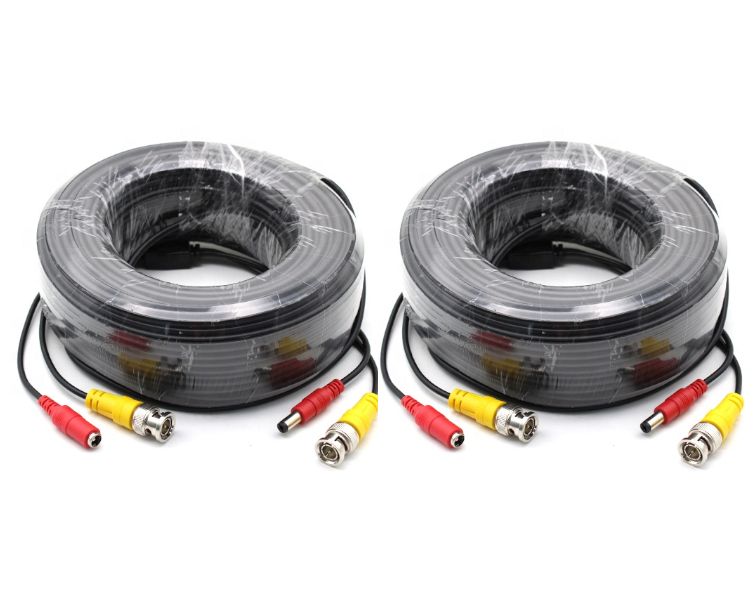
CCTV Camera Cable - 50m - Set of 2

CCTV Camera Cable - 50m - Set of 2

Brand: SBR
CCTV Camera Cable - 50m - Set of 2 Cables
3.73 Reviews
R 29.00R 34.80
🚚 Ships in 3-5 work days

CCTV Camera Cable - 50m - Set of 2 Cables

🛡️
Warranty
6-Month Limited Warranty.
↩️
Return Policy
Hassle-Free Exchanges & Returns for 7 Days.

Product Information

SKU99478582
Stock StatusIn Stock
Safe Checkout

CCTV Camera Cable - 50m - Set of 2 Cables

Brand: SBR

Includes:

2 x CCTV Camera Cable - 50m

Features:

  • All-in-one video and power cable for Analog AHD CCTV security camera
  • Transmit video signals and supply DC power;
  • BNC video & power connectors;
  • Plug and Play

Specifications:

  • DC Power Male Size: 5.5 x 2.1 x 18.0mm/ 0.22 x 0.08 x 0.7in
  • DC Power Male : Nickel Plating & Rubber
  • DC Power Female Size: 5.5 x 2.1 x 21.5mm/ 0.22 x 0.08 x 0.85in
  • BNC Material: Kirsite & Nickel Plating
  • Cable Length: 50 Meter

Common Issues Users Might Experience

Below are typical problems seen with CCTV camera cable deployments

troubleshooting tips

1. Signal Degradation / Weak Video

  • Video becomes fuzzy, grainy, or drops frames
  • Causes:
    Cable too long without signal booster
    Poor shielding or damaged cable
    Incompatible video system (e.g., digital camera on analog wiring)
  • Fixes:
    Use shorter runs where possible
    Check connectors and terminate properly
    Upgrade to higher-grade coax or use baluns

2. Power Loss / Camera Not Receiving Power

  • Camera doesn't turn on or reboots intermittently
  • Causes:
    Thin power conductors causing voltage drop over long runs
    Loose or poor power connector
  • Fixes:
    Use thicker conductors or a separate power supply
    Properly crimp/secure DC connectors

3. Interference / Snowy Picture

  • Lines, static, or rolling on screen
  • Causes:
    Electromagnetic interference (EMI) from nearby cables/devices
    Inadequate shielding
  • Fixes:
    Re-route cable away from power lines
    Use better shielded cable

4. Connector Issues

  • Loss of signal after pulling cable through wall or conduit
  • Causes:
    Bends too tight near connectors
    Crimped cable not seated properly
  • Fixes:
    Ensure proper cable bending radius
    Use quality crimp tools and connectors

5. Weather / Moisture Problems

  • Outdoor runs failing over time
  • Causes:
    Non-outdoor rated cable used outside
    Water ingress in connectors
  • Fixes:
    Use outdoor/UV jacket cable
    Use weatherproof junctions or sealing tape

6. Incompatible Standards

  • New HD cameras show no video
  • Causes:
    Cable or connectors not suitable for higher-frequency signals (AHD/TVI/CVI)
  • Fixes:
    Use cable rated for HD-over-coax distances
    Confirm camera & DVR compatibility

Quick Troubleshooting Tips

  • Always test cable with a video tester before final installation
  • Keep cable runs away from electrical power lines
  • Use ground loops transformers if you see rolling lines
  • Avoid sharp bends and crimps at connectors

What's in the box
2 x SBR CCTV Camera Cable - 50m

CCTV Camera Cable - 50m - Set of 2 Cables

Brand: SBR

Includes:

2 x CCTV Camera Cable - 50m

Features:

  • All-in-one video and power cable for Analog AHD CCTV security camera
  • Transmit video signals and supply DC power;
  • BNC video & power connectors;
  • Plug and Play

Specifications:

  • DC Power Male Size: 5.5 x 2.1 x 18.0mm/ 0.22 x 0.08 x 0.7in
  • DC Power Male : Nickel Plating & Rubber
  • DC Power Female Size: 5.5 x 2.1 x 21.5mm/ 0.22 x 0.08 x 0.85in
  • BNC Material: Kirsite & Nickel Plating
  • Cable Length: 50 Meter

Common Issues Users Might Experience

Below are typical problems seen with CCTV camera cable deployments

troubleshooting tips

1. Signal Degradation / Weak Video

  • Video becomes fuzzy, grainy, or drops frames
  • Causes:
    Cable too long without signal booster
    Poor shielding or damaged cable
    Incompatible video system (e.g., digital camera on analog wiring)
  • Fixes:
    Use shorter runs where possible
    Check connectors and terminate properly
    Upgrade to higher-grade coax or use baluns

2. Power Loss / Camera Not Receiving Power

  • Camera doesn't turn on or reboots intermittently
  • Causes:
    Thin power conductors causing voltage drop over long runs
    Loose or poor power connector
  • Fixes:
    Use thicker conductors or a separate power supply
    Properly crimp/secure DC connectors

3. Interference / Snowy Picture

  • Lines, static, or rolling on screen
  • Causes:
    Electromagnetic interference (EMI) from nearby cables/devices
    Inadequate shielding
  • Fixes:
    Re-route cable away from power lines
    Use better shielded cable

4. Connector Issues

  • Loss of signal after pulling cable through wall or conduit
  • Causes:
    Bends too tight near connectors
    Crimped cable not seated properly
  • Fixes:
    Ensure proper cable bending radius
    Use quality crimp tools and connectors

5. Weather / Moisture Problems

  • Outdoor runs failing over time
  • Causes:
    Non-outdoor rated cable used outside
    Water ingress in connectors
  • Fixes:
    Use outdoor/UV jacket cable
    Use weatherproof junctions or sealing tape

6. Incompatible Standards

  • New HD cameras show no video
  • Causes:
    Cable or connectors not suitable for higher-frequency signals (AHD/TVI/CVI)
  • Fixes:
    Use cable rated for HD-over-coax distances
    Confirm camera & DVR compatibility

Quick Troubleshooting Tips

  • Always test cable with a video tester before final installation
  • Keep cable runs away from electrical power lines
  • Use ground loops transformers if you see rolling lines
  • Avoid sharp bends and crimps at connectors

What's in the box
2 x SBR CCTV Camera Cable - 50m

More in Home Security Accessories