SALE
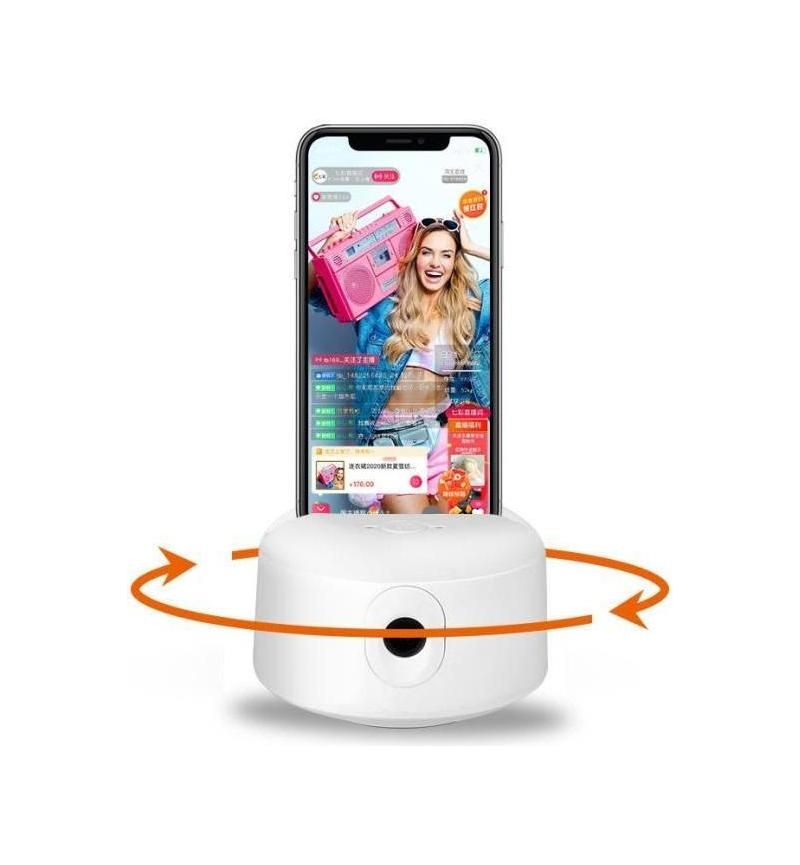
360 Degree Al Tracking Gimbal

360 Degree Al Tracking Gimbal

Product Model : JS008 Load : 800g Net Weight : 270g (include lithium-ion battery) Product Size : 118*67mm Phone Size…
No reviews yet
R 17.00R 20.40
🚚 Ships in 7-9 work days

Product Model : JS008 Load : 800g Net Weight : 270g (include lithium-ion battery) Product Size : 118*67mm Phone Size acceptable :

🛡️
Warranty
6-Month Limited Warranty.
↩️
Return Policy
Hassle-Free Exchanges & Returns for 7 Days.

Product Information

SKU71978548
Stock StatusIn Stock
Safe Checkout

Product Model : JS008

Load : 800g

Net Weight : 270g (include lithium-ion battery)

Product Size : 118*67mm

Phone Size acceptable : <7.0"

Mechanical Angle : Horizontal 350°

Working Angle : 6H

Power Supply Mode: USB+lithium-ion battery

Input Voltage: 5V 1A

Compatible to Android & IOS Systems iOS: ios10.0

Usage Scenario

There are two scenario: one is put on the desk, the other is put on tripod

There is no need for other settings if you to use it on desk

If you need to use tripod , please put tripod into tripod base and turn the base to tight

Turn on /off

This device has built in battery , we advise you to charge it for 6 hours before use it

Open the mobile holder, put your mobile (tablet) to adjust the holder

Hold the power button for 5 seconds, it will turn on, the indicator lamp will blink and the device will rotate one circle

If you need to turn off , please hold the power button 5 seconds again

How to use

Make sure the holder is tighten your mobile (tablet) before starting it , it will start tracking human face (body)

The best distance to use is 1-5 meters

About indicator lamp

There are 3 different mode of indicator lamp means different status of battery

The RED indicator lamp is off means the battery is full

The RED indicator lamp is blinking rapidly means battery low, need to charge the battery

The RED indicator lamp is blinking slowly means under charging

Note

Built ? in battery inside, do not put it in high temperature (over 50°C) or humidity environment

Use hand to rotate gimbal is not allowed

It can only track one human face (body) it is not recommended to use it when there are two or more people

Please charge the device in time when the indicator lamp is blinking red and make sure the adapter is 5V1A ( or 5V2A)

To avoid the device working wrong

What's in the box
1 x Gimbal

Product Model : JS008

Load : 800g

Net Weight : 270g (include lithium-ion battery)

Product Size : 118*67mm

Phone Size acceptable : <7.0"

Mechanical Angle : Horizontal 350°

Working Angle : 6H

Power Supply Mode: USB+lithium-ion battery

Input Voltage: 5V 1A

Compatible to Android & IOS Systems iOS: ios10.0

Usage Scenario

There are two scenario: one is put on the desk, the other is put on tripod

There is no need for other settings if you to use it on desk

If you need to use tripod , please put tripod into tripod base and turn the base to tight

Turn on /off

This device has built in battery , we advise you to charge it for 6 hours before use it

Open the mobile holder, put your mobile (tablet) to adjust the holder

Hold the power button for 5 seconds, it will turn on, the indicator lamp will blink and the device will rotate one circle

If you need to turn off , please hold the power button 5 seconds again

How to use

Make sure the holder is tighten your mobile (tablet) before starting it , it will start tracking human face (body)

The best distance to use is 1-5 meters

About indicator lamp

There are 3 different mode of indicator lamp means different status of battery

The RED indicator lamp is off means the battery is full

The RED indicator lamp is blinking rapidly means battery low, need to charge the battery

The RED indicator lamp is blinking slowly means under charging

Note

Built ? in battery inside, do not put it in high temperature (over 50°C) or humidity environment

Use hand to rotate gimbal is not allowed

It can only track one human face (body) it is not recommended to use it when there are two or more people

Please charge the device in time when the indicator lamp is blinking red and make sure the adapter is 5V1A ( or 5V2A)

To avoid the device working wrong

What's in the box
1 x Gimbal

More in Clients & Hardware